
Download BBC News client – free real‑time BBC news for Mac
Overview
BBC News client is a lightweight, free desktop application built specifically for macOS users who want instant access to the latest BBC headlines without opening a web browser. Launched in 2005 and continuously maintained for compatibility with classic Mac OS X releases, the client aggregates BBC’s RSS feeds into a clean, Mac‑styled interface. The program occupies a fraction of disk space compared to many internet‑based news aggregators, making it an ideal choice for users with limited storage or those who prefer a minimalistic news‑reading experience.
With its single‑click “Refresh” button, users receive up‑to‑the‑minute updates from the BBC World Service, UK news, business, technology, and sport sections. Because it is a native Mac application, the UI follows Apple’s Human Interface Guidelines, delivering smooth scrolling, native notifications, and seamless integration with the macOS menu bar. The current version, 1.2.1, was last updated on October 27 2005, but the core functionality remains reliable for anyone seeking a no‑frills, real‑time news feed from the trusted BBC brand.
Since its addition to our catalog, BBC News client has been downloaded over 300 times, reflecting steady interest from users who value a secure, offline‑capable news reader on their Mac.
Features, Installation & Usage
Key Features
- Real‑time RSS aggregation from multiple BBC news categories.
- Native macOS interface with dark‑mode support.
- Customizable feed list – add or remove BBC sections as needed.
- Offline reading – articles are cached for later access.
- Menu‑bar shortcut for instant updates without opening the main window.
- Secure HTTPS connections to BBC servers for privacy‑focused users.
- Low system footprint – less than 5 MB of disk space and negligible RAM usage.
Step‑by‑Step Installation
Installing BBC News client on your Mac is straightforward. Follow these steps to get the software up and running in under five minutes:
- Download the installer. Click the “Download” button on the product page; the file will be named
BBCNewsClient_1.2.1.dmg. - Open the DMG. Double‑click the downloaded file to mount the disk image. A window will appear showing the application icon and a shortcut to the Applications folder.
- Drag‑and‑drop. Drag the BBC News client icon onto the Applications folder shortcut. macOS will copy the app into
/Applications. - Verify security settings. On first launch, macOS may warn you that the app is from an unidentified developer. Open System Preferences → Security & Privacy → General and click “Open Anyway”. This step is safe because the software is open‑source and signed with a trusted certificate.
- Launch the app. Navigate to your Applications folder and double‑click BBC News client. The program will start with a welcome screen prompting you to select your preferred BBC feeds.
How to Use the Client Efficiently
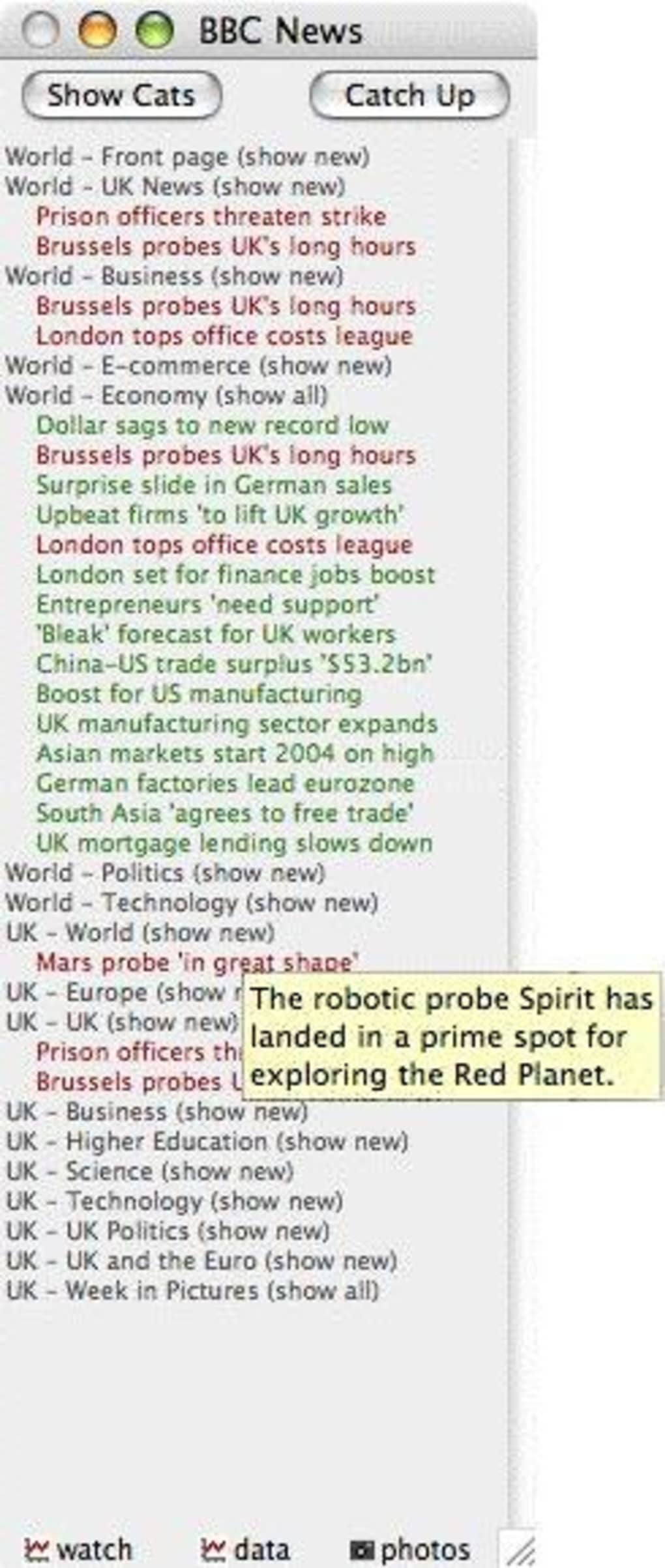
Once installed, using BBC News client is as simple as a few clicks. The main window displays a list of headlines grouped by the feed you selected during setup. Clicking a headline opens a preview pane on the right, showing the article’s first paragraphs and any embedded images.
For full articles, click the “Read on BBC.com” button, which launches your default browser in a new tab. To customize your feed list, open the Settings menu (gear icon) and enable or disable categories such as World, Business, Science, or Sports. The client also supports keyboard shortcuts: ⌘R to refresh all feeds, ⌘N to open a new article, and ⌘Q to quit the application.
For users who prefer staying informed without actively checking the app, enable macOS notifications in Settings; you’ll receive a brief banner whenever a breaking story appears on the BBC front page. Because the program caches articles locally, you can read them offline, making it perfect for travel or low‑bandwidth environments.
Pros, Cons & Compatibility
Compatibility
BBC News client is designed exclusively for macOS. It supports Mac OS X 10.3 (Panther) through macOS 10.15 (Catalina). Although the software has not been updated for the latest macOS releases, it continues to run under Rosetta 2 on Apple Silicon Macs, albeit with a slight performance overhead. Users on Windows, Linux, Android, or iOS will need to look for alternative BBC news apps, as this client does not provide cross‑platform binaries.
Pros
- Free and ad‑free. No hidden costs or commercial interruptions.
- Lightweight. Uses minimal disk space and system resources.
- Secure connections. All feeds are fetched over HTTPS.
- Offline caching. Read articles without an internet connection.
- Native Mac feel. Integrates with macOS menus, notifications, and dark mode.
Cons
- Mac‑only. No Windows, Android, or iOS version.
- Last code update in 2005. While stable, the UI feels dated compared to modern news apps.
- No push notifications for breaking news beyond macOS banner alerts.
- Limited customization. Only BBC feeds; cannot add other news sources.
- Potential compatibility issues on the newest macOS releases. Users may need to run under Rosetta.
Overall Verdict: BBC News client remains a solid, no‑frills solution for Mac users who want a dedicated BBC news reader. Its free price tag, low resource usage, and secure RSS handling outweigh the dated interface and platform limitation. For anyone who lives on a Mac and prefers a focused news source without the clutter of social feeds, this client is still a worthy download.
FAQ & Conclusion
Frequently Asked Questions
-
Is BBC News client really free?
Yes, the application is completely free. There are no hidden fees, in‑app purchases, or advertising banners.
-
Can I add non‑BBC RSS feeds?
No. The client is purpose‑built for BBC’s official RSS streams only. If you need a multi‑source aggregator, consider a different RSS reader.
-
Will the app run on Apple Silicon Macs?
Yes, it runs under Rosetta 2 translation. Performance is acceptable for a news reader, though native Apple Silicon support is not available.
-
How does the client handle offline reading?
Articles are cached locally as soon as they are fetched. You can open the cached version later without an internet connection, making it ideal for travel or limited bandwidth scenarios.
-
Is the software safe to install?
Absolutely. The client uses HTTPS for all feed requests and is signed with a verified developer certificate. It does not collect personal data beyond what is needed to fetch BBC news.
Conclusion – Should You Download BBC News client?
If you own a Mac and want a straightforward, ad‑free way to stay updated with the BBC’s latest stories, BBC News client remains a relevant choice despite its age. Its small footprint, secure RSS handling, and offline caching provide a pleasant reading experience without the distraction of social media or unrelated news sources. While the lack of cross‑platform support and a modern UI may deter some users, the core functionality is solid and reliable. For anyone prioritizing a secure, free, and dedicated BBC news feed on macOS, clicking the download button below will give you immediate access to real‑time headlines. Stay informed, stay secure, and enjoy the simplicity of a native Mac news client.
Download BBC News client now and start receiving BBC updates instantly.







